Showing posts with label Internet Tools. Show all posts

Tuesday, November 5, 2013

MailWasher Pro 2013 7.3.0 Full with key


MailWasher Pro 2013 7.3.0 | 10.3 MB

MailWasher Pro is an application that was created to let users regain control of their e-mail inbox.
The overwhelming amount of spam on the Internet is set to increase exponentially over the next few years, with users already facing serious security threats, families being exposed to objectionable content and product scams bombarding inboxes worldwide. 


ဒါေလးက အေရွ႕မွာတင္ေပးခဲဖူးတဲ့ Postbox , Gmail Notifier တို႔လုိ ေမးလ္အေကာင့္ အမ်ားၾကီးကို တခါ တည္း Signup လုပ္ထားျပီး ေနာက္တၾကိမ္ဝင္စရာမလိုပဲ အလြယ္ တကူဝင္ေရာက္နုိင္ဖို႔ကူညီနိ္ုင္ပါတယ္.. ေနာက္ျပီး ေမးလ္ေတြမွာ သတိထားေၾကာက္စရာ ေကာင္းတဲ့ Spam ေတြကိုလည္း တားဆီးနိုင္မွာ ျဖစ္ျပီး သူလိုအလားတူ Program ေတြျဖစ္တဲ့ Postbox တို႔လို႔ ေကာင္ေတြကတဆင့္ Import လုပ္ျပီး အသံုးျပဳနုိင္တာေၾကာင့္ တကယ္ေကာင္းတဲ့ Software ေလးျဖစ္ပါတယ္ဗ်ာ....... ..  ေအာက္မွာေဒါင္းယူလုိက္ၾကပါဗ်ာ။ 


Stop spam, scams and other junk

Receiving spam is like those telemarketers who call at dinner time, completely annoying and you didn't ask for it. Luckily you can stop this now!
Install MailWasher today to screen all your email accounts in one place and allow only the email you want in your inbox.
MailWasher lets you preview all your email before it gets to your computer or mobile device, enabling you to read all your email securely, and instantly delete any unwanted or suspicious email. Your remaining good email is downloaded to your PC or mobile device, saving you from receiving any spam or email viruses.

When you use MailWasher, the benefits become obvious.

  • Zero spam in your computer or mobile device.
  • Inspect any email before it gets to your computer or mobile device.
  • Never lose an email because you can't afford to.
  • Intelligent spam tools ensure spam is caught and good email is not
With over 8 million users, 18 languages and features on both BBC World and CNN you can be confident that using MailWasher is one of the easiest ways to get rid of spam.
add to digest
Receive only the email you want
 
Check your email with MailWasher first. You'll be safer with the knowledge of what's waiting for you on the server, allowing you to quickly inspect and read your email and remove any unwanted messages quickly and easily.
In 3 simple steps you'll be spam free.
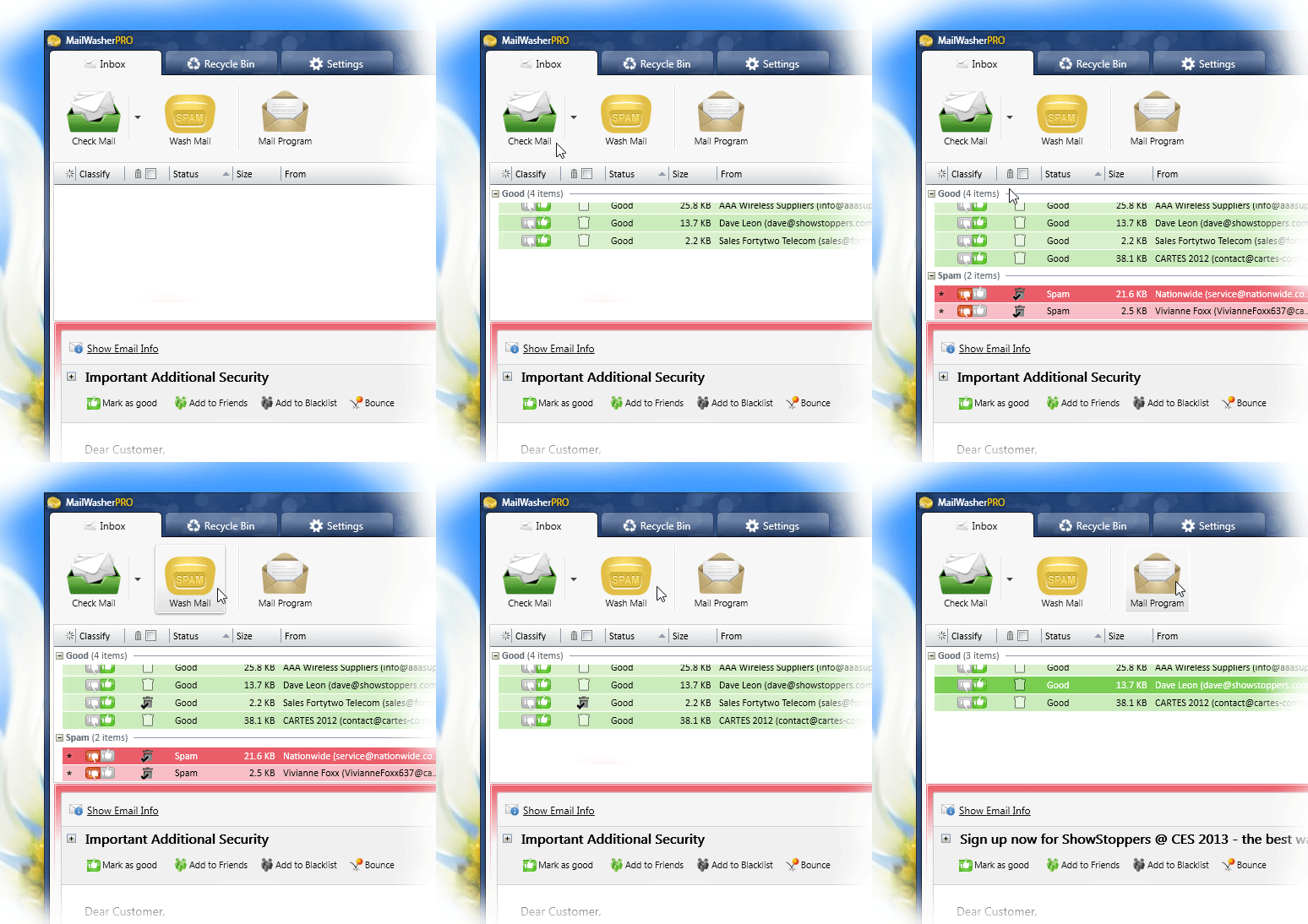
1. Press the Check Mail button
2. Mark any unwanted messages for delete
3. Press the 'Wash Mail' button to remove the spam
The remaining good email is downloaded to your computer.

Control when you receive email
Inspect your email before it gets to your pc

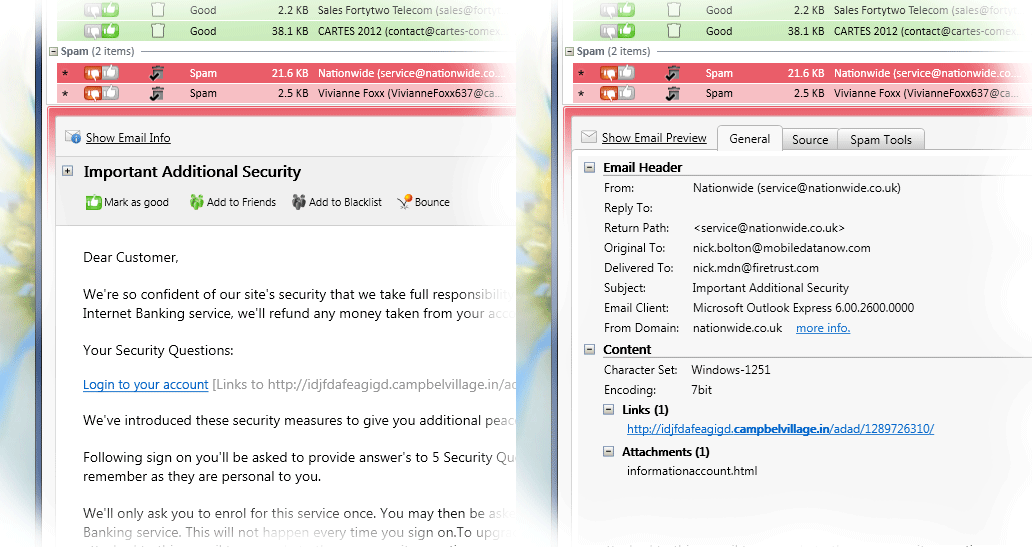
View everything about your messages before they get to your computer so you can determine if they're really spams, scams or good email. This means you can delete unwanted messages at the server so you only get the email you want.
MailWasher lets you view the email safely in plain text, but you can also inspect who it's really from, who owns the company who sent it (WHOIS report) and all the hidden links.
Given that you can't afford to lose any legitimate email, MailWasher lets you have the final say on it before letting you 'Wash' the spam away.


Organize emails to a digest
Intelligent spam tools 

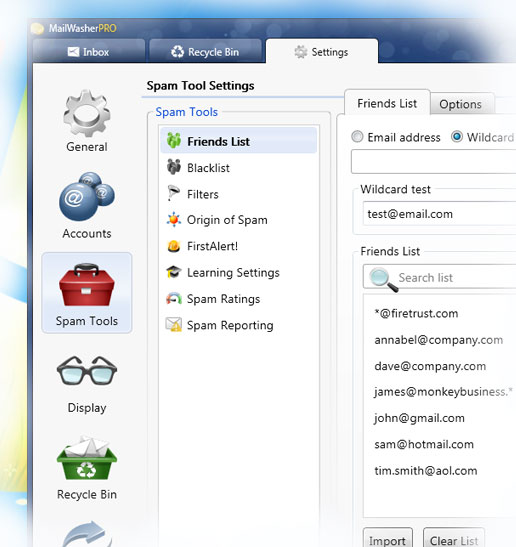
Advanced spam detection technology and tools do all the hard work for you by automatically marking spam emails.

From simple friends list, blacklists and learning filters to advanced custom filters, MailWasher has you covered.


MailWasher Pro protects users from these threats and allows safe, secure management of their e-mail. Previewing messages on their mail server, MailWasher Pro lets users delete any harmful content before it reaches their mail program and wreaks havoc on their computer.
Created for home users who deem their online privacy and security as paramount, MailWasher Pro has already become a highly regarded e-mail security solution.

MailWasher Pro works directly with your email server, exactly like your email program does. But there is one important difference; you can tell MailWasher Pro to delete a message at the server, without downloading it - or you can bounce an email back to the sender sothat it looks as though your address is not valid.

MailWasher Pro retrieves information about all the email on the server. With that information (some of which is also processed by MailWasher Pro) you can decide what to do with each individual email - download, delete, report or bounce it back.

If you check your accounts with MailWasher Pro first, you can deleteor bounce the email you do not want. Then, when you use your email program, it downloads only the remaining emails, those that you wantto read.

MailWasher Pro can be thought of as a "first line of defense" which
can weed out junk, large wasteful attachments, and potentially harmful viruses.


Download >>> solifiles (or) Uppit (or) tusfiles


How to Activate with key

Step 1: Install the program
Step 2: Copy the key.file to the Application Data\Firetrust\MailWasher
Step 3: Run the application.
   
XP
C:\Documents and Settings\{username}\Application Data\Firetrust\MailWasher
    
Vista/7/8
C:\ProgramData\Application Data\Firetrust\MailWasher\
C:\Users\{username}\AppData\Firetrust\MailWasher\
         
Enjoy!


MetaProducts Offline Explorer Enterprise v6.7.4016 SR1 Full With Keygen

MetaProducts Offline Explorer Enterprise  v6.7.4016 SR1 | 13.2 MB
 
Using Offline Explorer Enterprise, you can download an unlimited number of your favorite Web, FTP, HTTPS, MMS, PNM and RTSP sites for later offline viewing, editing or browsing. Offline Explorer Enterprise is the most sophisticated offline browser that also has many web development features to easily edit, view, browse or search your downloaded Web pages using its built-in browser.

Offline Explorer Enterprise combines the usability of Offline Explorer with the power of Offline Explorer Pro and adds:
  • The ability to download up to 100 million URLs per Project;
  • An OLE Automation interface to enable control from other applications;
  • The ability to update Projects with deleted files;
  • Internal Proxy server to access downloaded sites transparently in your browser;
  • Generation of Google SiteMap files.
  • The fastest-possible multi-threaded processing of downloaded files by using all CPU cores.
  • Password-protected access to the Internal server from other computers.

Offline Explorer Enterprise is an ideal product for companies that want to have their own offline browsing solutions. We put all our experience - since January 1997 - in offline browsing into it.


သူ႔ကိုသံုးဖူးတဲ့သူမ်ားကေတာ့သိၾကမွာပါ။အေရွ႔မွာလည္းတင္ေပးခဲဖူးပါတယ္..။ အခု Version အသစ္
ေလးရလာလို႔ ထပ္တင္ေပးလုိက္ရတာပါ။
ဒီေကာင္ေလးက ကုိယ္နွစ္သက္တဲ့ Website တစ္ခုလံုး
ကိုDownload ဆြဲျပီး Offline အေနနဲ႔ ၾကည့္လို႔ရပါတယ္။ ကိုယ္ဆြဲတဲ့ ဆိုဒ္ရဲ့ Data အနည္းအမ်ားေပၚ
မူတည္ျပီးၾကာခ်ိန္ေတာ့ကြာျခားနိုင္ပါတယ္။ လိုအပ္ရင္ေတာ့ေအာက္မွာယူလိုက္ၾကပါဗ်ာ..။


Huge downloads possible
The enterprise edition was optimized to use as little memory as possible during downloads. We redesigned the parsing queue and map files format. Map files are no longer loaded in memory, but kept on the disk. Offline Explorer Enterprise reads only the necessary map segments to display in the Project Map or to add new entries.
Map files now have an .mpx extension and are not compatible with other versions of Offline Explorer. Offline Explorer Enterprise converts old map files to the new format when necessary, but the reverse operation is not included. So, if you install Offline Explorer or Offline Explorer Pro over the Enterprise edition, some map information might be lost. Projects and other files formats are the same, so all settings, Projects and templates will be preserved.

Make your own offline browsing solution
OLE Automation opens Offline Explorer Enterprise to solution developers. It is now possible to write a program using Visual C++, Visual Basic, Delphi or another COM-compatible development environment to start new downloads, manage Projects and process downloaded Web sites via Offline Explorer.
Offline Explorer Enterprise provides full access to its folders, Projects and downloads. A complete help file on OLE Automation details is provided in the Content section.

Update Projects with deleted files
Now you can delete downloaded Project files and Offline Explorer Enterprise will still be able to download only new or modified files from the Web site.
The information about the files you remove is stored in a compact database.
For example, if you downloaded a collection of large PDF files that were burned on a CD, you can delete the files from your hard disk using the Delete | Only Project Files command. When you start downloading the Project the next time, Offline Explorer Enterprise will determine if any of the deleted files have changed and download only new and updated files.
This feature saves space by preventing storage of duplicate files.

Internal Proxy server
You can setup your browser to use Offline Explorer Enterprise as a HTTP proxy (port 800 by default). When you browse to the sites that were downloaded, the proxy will show them from the download directory. Other sites will be downloaded from the Internet transparently.
Also, Offline Explorer Enterprise logs will show you all links that were requested by the browser. This may help you to find the actual links to video, scripted images, etc.

Offline browsing made easy
One of Offline Explorer Enterprise`s strengths is to allow you to selectively include or exclude individual servers, directories and files using keywords. It is known for its excellent user interface and as one of the fastest Web site downloaders available on the market today. Support of industry-standard technologies such as FTP, HTTPS, different proxy servers, Java and VB scripts, Java classes, Cascading Style Sheets (CSS,) Macromedia Flash, XML/XSL/DTD,Table Of Contents (TOC,) Acrobat (PDF,) M3U, AAM files, RealMedia (.SMIL, .RAM, .RPM,) MS NetShow Channel (.NSC,) VRML (.WRL, .WRZ,) QuickTime (.MOV,) MMS, PNM and RTSP audio/video streams and cookies plus a built-in HTTP server that allows you to share downloaded files over an Intranet, make Offline Explorer Enterprise the leader in offline browsing.

See how Offline Explorer Enterprise excels among other offline browsers.

The most significant new features:
  • Office 2010-like Ribbon Navigation
  • File | Backstage view with a project information and statistics
  • System Monitor with charts to see usage of computer resources
  • Redesigned Schedule Manager & Sequencer panels
  • Working search forms at the downloaded pages
  • Unicode domain names support
  • Download & playback of embedded video for popular video-hosting sites

Support OS
  • Microsoft® Windows XP, Windows 2003, Windows Vista, Windows 2008, Windows 7, Windows 8.The program also runs on the corresponding Windows 64-bit platforms.


Download >>> solidfiles (or) Uppit (or) tusfiles


Saturday, November 2, 2013

CCProxy 7.3 Build 20131031 Full With Keymaker

CCProxy 7.3 Build 20131031 | 3.4 MB
CCProxy – compact proxy server that allows to go online to all computers on the local network via a single connection.
Supports the basic necessary protocols, port forwarding, cache, range in speed, content filters, and multiple methods of authentication.

 CCproxy သံုးတဲ့ သူငယ္ခ်င္းေတြအတြက္ Update ဗားရွင္းေလး ရလာလို႔ တင္ေပးလိုက္ပါတယ္ဒါေလးက internet acess ေတြ bandwidth ေတြ web filtering ေတြ content filtering ေတြနဲ ့control အစရွိတာေတြကိုအေကာင္းဆုံးထိန္းခ်ဳပ္ေပးႏိုင္တာေတြရပါတယ္ HTTP, FTP, Gopher,SOCKS4/5, Telnet, Secure (HTTPS), News (NNTP), RTSP and MMS ေတြကို လဲေကာင္းေကာင္းအေထာက္အပံ့ေပးအလုပ္လုပ္ႏိုင္တာေတြရပါတယ္Full Version အျဖစ္ အသံုးျပဳႏိုင္ေအာင္ Keymaker ေလးပါ ထည့္ေပးထားပါတယ္သံုးတတ္တဲ့သူငယ္ခ်င္းေတြအတြက္ပဲ ရည္ရြယ္ၿပီး တင္ေပးလိုက္ပါတယ္လိုခ်င္တဲ့သူငယ္ခ်င္းမ်ား ေအာက္မွာ ေဒါင္းယူႏိုင္ပါတယ္ဗ်ာ..

CCProxy:
• Support HTTP, FTP, Gopher, SOCKS4 / 5, Telnet, Secure (HTTPS), News (NNTP), RTSP
• divestiture of users
• Web filter
• Control of traffic
• built-in cache
• Resolution normalized Web / IP / MAC / IP
• Proxy cascading
• Automatic connection and disconnection on schedule.
OS: Windows 7, Windows 2008, Vista, XP, Windows 2000, Windows 2003.
Home Page - http://www.youngzsoft.net/ccproxy/


Download >>> solidfiles (or) uppit (or) tusfiles


Sunday, October 27, 2013

WebcamMax 7.7.8.8 Full With Keygen

WebcamMax 7.7.8.8 | 25.4 MB
Stream videos, movies, flash, desktop screen, pictures to virtual webcam; add floating text, frame, transform, emotion effects over real webcam. For all webcam programs (MSN, ICQ, AIM, Skype, Camfrog, Paltalk, Yahoo Messenger and etc). Your chat mate will be attracted by your webcam. More than 1500 effects online. DIY webcam effects. Webcam video recorder. Webcam snap. Share webcam in 16 programs. Fast switch between virtual and real webcam.


 မိမိစက္မွာ Webcam တပ္ထားျပီး Video ခ်က္လုပ္တတ္သူမ်ားေဆာင္ထားသင့္ပါတယ္။
Setting ေတြစိတ္ႀကိဳက္ ခ်ိန္ညိွနိုင္သလို အျခားအသံုးဝင္ Tools ေတြလည္းအမ်ားအျပားပါဝင္ပါတယ္။
အျခားလုပ္ေဆာင္နိုင္တာေတြကိုလည္းေအာက္မွာ ဖတ္ရႈနိုင္ေအာင္ မူရင္း ဆိုဒ္ကအတိုင္း ေဖာ္ျပေပးလိုက္
ပါတယ္။


Key features:
• For all webcam programs, such as ICQ, AIM, MSN, Camfrog, Skype, Paltalk, Yahoo Messenger…
• Virtual webcam or enhance real webcam.
• Videos and movies to webcam.
• Desktop screen to webcam.
• Pictures to webcam.
• Floating text over webcam.
• Frame effects over webcam.
• Transform effects over webcam.
• Emotion effects over webcam.
• Webcam effects update weekly online.
• Webcam video recorder.
• Webcam snap.
• Fast switch between virtual and real webcam.
• Share webcam in 16 programs.
• DIY webcam effects.

OS: Windows 2000/XP/Vista/7 (32-bit and 64-bit)
Homepage – http://www.webcammax.com/


Download>>> Uppit  (or) Tusfiles


Sunday, July 28, 2013

CCProxy 7.3 Build 20130724 Full With Keymaker


CCProxy 7.3 Build 20130724 Multilingual | 5.2 MB
 CCproxy သံုးတဲ့ သူငယ္ခ်င္းေတြအတြက္ Update ဗားရွင္းေလး ရလာလို႔ တင္ေပးလိုက္ပါတယ္
ဒါေလးက internet acess ေတြ bandwidth ေတြ web filtering ေတြ content filtering ေတြနဲ ့
control အစရွိတာေတြကိုအေကာင္းဆုံးထိန္းခ်ဳပ္ေပးႏိုင္တာေတြရပါတယ္ HTTP, FTP, Gopher,
SOCKS4/5, Telnet, Secure (HTTPS), News (NNTP), RTSP and MMS ေတြကိုလဲေကာင္း
ေကာင္းအေထာက္အပံ့ေပးအလုပ္လုပ္ႏိုင္တာေတြရပါတယ္Full Version အျဖစ္ အသံုးျပဳႏိုင္ေအာင္ Keymaker ေလးပါ ထည့္ေပးထားပါတယ္သံုးတတ္တဲ့သူငယ္ခ်င္းေတြအတြက္ပဲ ရည္ရြယ္ၿပီး တင္
ေပးလိုက္ပါတယ္လိုခ်င္တဲ့သူငယ္ခ်င္းမ်ား ေအာက္မွာ ေဒါင္းယူႏိုင္ပါတယ္ဗ်ာ..


 Download >>>dropbox (or) solidfiles  (or) uppit (or) tusfiles


Proxy Server CCProxy lets all computers on the LAN access Internet through one single Internet connection. Just need to install Proxy Server CCProxy on the server which can access Internet directly and the other PC clients can connect to the Internet through the proxy software. It will provide you a cost-effective Internet connection sharing solution without losing ease of use and peace of mind.

Proxy server CCProxy is easy-to-use and powerful. This enables you set up your own proxy server and realize Internet connection sharing within 10 minutes. CCProxy includes innovative features like Internet access control, web filter, bandwidth control, web cache, parent, remote dial-up, auto dialup and time schedule puts you in a complete control of the Internet access. It also provides some advanced and interesting functions. Proxy software CCProxy can well accommodate your Internet sharing whether for business or home network.

CCProxy Main features:

• Modem, Cable Modem, ISDN, ADSL, Satellite, DDN and so on are supported(more).
• HTTP, FTP, Gopher, SOCKS4/5, Telnet, Secure (HTTPS), News (NNTP), RTSP and MMS proxy are supported.
• Port Mapping is supported.
• Web cache can enhance browsing speed. The size and refresh time of cache can be freely changed.
• Bandwidth control flexibly manages the traffic condition of clients.
• Time schedule can freely control the clients’ on-line time(access time control).
• Web filter can ban the specified web sites or contents. Also can name specific web sites for browsing.
• URL filtering prevents users from downloading files with designated extended name via IE.
• Seven types of account authentication: IP address, IP range, MAC address, User Name/Password, IP + User Name/Password, MAC + User Name/Password and IP + MAC.
• Parent proxy function enables CCProxy to access the Internet via another proxy.
• Dial-On-Demand, remote dial up and auto disconnect are supported.
• Access Logging can keep a full set of the Internet access log.
• Enable IE, Netscape to access the Internet through HTTP/Secure/FTP (Web)/Gopher.
• SOCKS5 proxy support allows use of ICQ, MSN Messenger, Yahoo Messenger, CuteFTP, CuteFTP Pro and WS-FTP.
• Mail proxy supports Outlook, Eudora etc.
• Supports NetTerm accessing the Internet via Telnet proxy.
• Supports Outlook connecting to the News server via News proxy.
• Support SOCKS5 and web authentication.
• Support for Real Player RTSP proxy and Media Player MMS proxy.
• Built-in DNS can resolve domain names.
• Flow Stats.

Home Page: http://www.youngzsoft.net/


Monday, June 3, 2013

Internet Lock 6.0.3 Final Full Version With Serial

အင္တာနက္အသံုးျပဳသူေတြ အတြက္သင့္ေတာ္မယ့္ Software ေလးတစ္ခုမွ်ေ၀ေပးလိုက္ပါတယ္ဗ်ာ။ မရွိမ
ျဖစ္ေတာ့မဟုတ္ေပမယ့္ ဒါမ်ိဳး Software ကနည္းနည္းေလးရွားလို႕ ေတြ႕တုန္းေလးယူထားေစခ်င္ပါတယ္ဗ်ာဘယ္လိုအသံုး၀င္လည္းဆိုရင္ေတာ့Internet Connection ကို Password ေပးျပီး Lock ခ်ထားလို႕ရပါတယ္ဗ်ာ။ ဒါ့အျပင္ ၀င္မၾကည့္ေစခ်င္တဲ႕Website ေတြကိုလည္း ပိတ္ထားလို႕ရပါတယ္။ Internet Explorer, Firefox, Google Chrome အျပင္အျခားေသာ Browser ေတာ္ေတာ္မ်ားမ်ားကို Support လုပ္ေပးႏိုင္ပါတယ္ဗ်ာ။ Internet ခ်ိတ္ဆက္ထားတဲ႕ဌာနဆိုင္ရာေတြ Company ေတြမွာ ဆိုရင္ေတာ့ ပိုျပီးအသံုး၀င္ပါလိမ့္မယ္
အေသးစိတ္ကိုေတာ့ေအာက္မွာရွင္းျပေပးထားပါတယ္ဗ်ာ။


          Download>>>solidfiles (or) dropbox (or) zippyshare (or) uppit


Internet Lock is an access control and password protection solution for your internet connections and programs. With Internet Lock, you can fully control the internet connections and programs on your computer.

By using Internet Lock, you can restrict or password protect internet access, schedule internet access, protect internet programs on certain IP addresses or domains, limit users to access only the websites you specified, or keep them from accessing the unwanted websites.

Restrict internet access:
Password protect internet access.
Schedule internet access for any or all programs.
Block internet websites.
Prevent users or groups from accessing internet.


Restrict internet connections and programs
You can use Internet Lock to restrict internet connections and programs. Programs blocked by Internet Lock will not be able to access the internet.
Internet Lock supports to protect all internet programs including, but not limited to: Web browsers: Internet Explorer, Firefox, Google Chrome and so on.
Email clients: Outlook, Outlook Express...
FTP programs.
Instant Messenger.
And all other internet programs.


Screenshot:


Install Notes:
1] Install The App
2] Enter Username and Serial
3] Enjoy This Release!!