Showing posts with label Windows ဆိုင္ရာ. Show all posts

Sunday, September 22, 2013

Yamicsoft Windows 7 Manager v4.3.2 Full With Keygen

Yamicsoft Windows 7 Manager 4.3.2 | 10.9 MB


Yamicsoft Windows 7 Manager 4.3.2 ေနာက္ဆံုးထြက္ေလးတင္ေပးလိုက္ပါတယ္ 
သူကေတာ့ Windows 7 အသံုးျပဳတဲ့သူငယ္ခ်င္းတိုင္း လက္မလြတ္သင္တဲ့ ေဆာစ့္၀ဲလ္ေလးပါ
သူ႔ရဲ႕Features အခ်ဳိ႕ကေတာ့ System ေတြနဲ႔ hardware information ေတြကိုလည္းအေသးစိတ္ကအစ ၾကည္႔ရွဴနုိင္ျခင္း ၊မိမိတို႔စက္ထဲမွာရွိတဲ႔ running processes နဲ႔ threads ေတြရဲ႕ အခ်က္အ လက္ေတြ ကိုလည္းအေသးစိတ္ၾကည္႔ႏုိင္ျခင္း၊Windows 7 Manager မွာ 1-clicking cleans system automatically လည္းပါဝင္ျခင္း၊windows startup and shutdown speed ကိုလည္း တိုးျမွင္႔ေပးႏုိင္ျခင္း၊ hardware ေတြရဲ႕ system speed နဲ႕ performance ေတြကိုလည္း တိုးျမွင္႔ေပးႏုိင္ျခင္း၊မ လိုအပ္တဲ႔ system tasks ေတြကိုလည္း Turn off လုပ္ေပးႏုိင္ျခင္း၊ Registry Cleaner ကလည္း မိမိတို႔ရဲ႕ incorrectly linked registry entries အလိုအေလ်ာက္ဖယ္ရွားေပးျခင္း နဲ႔စတဲ႔ Features ေလးေတြေတာ္ေတာ္မ်ားမ်ားကိုပါဝင္ပါတယ္။
 

What is Windows 7 Manager?
Windows 7 Manager is a system utility that helps you optimize, tweak, repair and clean up Windows 7. It will increase your system speed, eliminate system fault, improve system security, and meet all of your expectations.Windows 7 Manager is a system utility that helps you optimize, tweak, repair and clean up Windows 7. It will increase your system speed, eliminate system fault, improve system security, and meet all of your expectations.

Windows 7 Manager Features:
  • Information
  • Optimizer
  • Cleaner
  • Customization
  • Security
  • Network
  • Misc. Utilities

Why Should I use Windows 7 Manager?Windows 7 is the Operating System for home users and professionals alike. Windows 7 brings clarity to your world, so you can more safely and easily accomplish everyday tasks and instantly find what you want on your PC.Windows 7 Manager is the powerful software tool to tweak and optimize your Windows 7, it bundles more than 30 different utilities in one and help your system faster and more stable, secure and personal!

Features and Benefits of Windows 7 Manager
 
Information:
Get detailed system and all hardware information on your system; help you find out the installation key of Windows, Office products; show all detailed information of running processes and threads on your machine; Windows 7 Manager offers 1-clicking Cleaner cleans your system automatically; Repair Center helps you to fix various system problems.

Optimizer:
Tweak your system to improve windows startup and shutdown speed, tweak your hardware to increase system speed and performance; Control what is started on Windows startup, check and repair the advanced starup items to restore the malicious change by viruses; Tune up and optimize system services and Task Schedule, turn off smartly some unnecessary system services and tasks to improve system performance.

Cleaner:
Find out which files or folders engross your disk space and shown with chart; Smart Uninstaller can fully delete programs from your system without residual files and Registry entries; Find and clean junk files to increase Hard Disk space; Duplicate Files Finder can scan your computer for files with the same size, name and modification time; Registry Cleaner checks and repair incorrectly linked Registry entries; Registry Defrag rebuilds and re-indexes your Registry to reduce registry access time and therefore improve application responsiveness; Desktop Cleaner can clean useless icons and files on Desktop easily.

Customization:
Customize the look of your system by tweaking system Explorer, Desktop, Start Menu, Taskbar and notification area; Create the quick startup items on Taskbar with the Jump List launcher; Tune up Windows 7 boot menu; edit context menus of mouse Right-Clicking; Create the shortcut that executed quick on run dialog box. Visual Customizer can change system and file type icons, custom the logon background.

Security:
Improve system security by tweaking system components, UAC and login settings; Tune up System Restore options; Hide and restrict to access drives and programs; Encrypt/decrypt files, move system folders to safe locations; Undelete the files that accidentally deleted or formatted on disk; Privacy Protector can maintain your personal privacy by eliminating the tracks that you leave behind; Hide, add or delete the Control Panel entries.

Network:
Optimize your Internet connection speed, manage all shares items; Tweak your Internet Explorer easily; IP Switcher can switch your IP address easily on different networks; Edits the Hosts file to speed up surfing internet and permit only to access the specified Hosts.

Misc. Utilities:
Show the collection of Windows utilities and pin system items to Taskbar; split and merge any files; Automatically back up files regularly using Super Copy. Registry Tools help you to operate Registry easily.


Windows 7 Manager 4.3.2 Released!

09/22/2013:
  • Add some tweaks
  • Lock System updated to v1.2
  • Context Menu Manager updated to v4.6
  • IE Manager updated to v4.4
  • Pinned Manager updated to v1.2
  • Run Shortcut Creator updated to v2.4
  • Startup Manager updated to v2.9
  • Visual Customizer updated to v4.1
  • Windows Utilities updated to v3.9


Download>>> tusfiles (or) solidfiles  (or) uppit


Friday, September 13, 2013

BlueStacks for Windows 7/8 Offline installer (Standalone Installer)

BlueStacks for Windows 7/8 Offline installer | 103.3 MB


BlueStacks is an Application, used to run android apps on PC. In Simple words we can say as Bluestacks is an Android Emulator for your PC.

BlueStacks supports all Android Apps and Games in your PC machines, so now you can enjoy your android apps like WhatsApp, Facebook and games like Temple Run, Road rash and much more in your Windows XP, Windows 7 and Windows 8 machines.

From Bluestacks official website you can download the online setup download. File size of the Bluestacks installer file is near to 9MB. If you tried to install that in your machine it will take so much time and you need internet connection to install BlueStacks. To install Bluestacks Application through online installer in your windows machines needs lots of files to download from internet.

So if you Download BlueStacks offline installer you don’t need of internet connection and you can install Bluestacks Application faster in your machines.


  ဒီေကာင္ေလးကWindows OS ေပၚမွာ Android OS ရဲ့ App ေတြ အသံုးျပဳနုိင္ေအာင္ ကူညီေပးမယ့္ေကာင္ေလးျဖစ္ပါတယ္။ သိတဲ့သူေတြကေတာ့သိျပီးျဖစ္မွာပါ။ မသိတဲ့သူေတြလည္း 
စမ္းသံုးၾကည့္လုိက္ၾကပါဗ်ာ။ အခုက Offline Installer ကိုမူရင္းလင့္အတိုင္းတင္ေပး
ထားတာျဖစ္တာေၾကာင့္ အျမဲ Up to date ျဖစ္ေနမွာျဖစ္ပါတယ္။


How to Install BlueStacks offline installer on your Windows Machines

  1. Download BlueStacks offline installer for Windows 7 / Windows XP / Windows 8
  2. Double Click the MSI file to install BlueStacks in your Machine
  3. Now BlueStacks installation will start on your Machine
  4. Follow the instruction on-screen.
  5. Installation Progress will start on your machine.
After installation completes you can see your Bluestacks icons on your System Tray(Near to Time)


Download (Direct Link)


Thursday, August 29, 2013

Yamicsoft Windows 7 Manager 4.3.1 Full With Keygen

Yamicsoft Windows 7 Manager 4.3.1 | 10.8 MB

Yamicsoft Windows 7 Manager 4.3.1 ေနာက္ဆံုးထြက္ေလးတင္ေပးလိုက္ပါတယ္ 
သူကေတာ့ Windows 7 အသံုးျပဳတဲ့သူငယ္ခ်င္းတိုင္း လက္မလြတ္သင္တဲ့ ေဆာစ့္၀ဲလ္ေလးပါ
သူ႔ရဲ႕Features အခ်ဳိ႕ကေတာ့ System ေတြနဲ႔ hardware information ေတြကိုလည္းအေသးစိတ္ကအစ ၾကည္႔ရွဴနုိင္ျခင္း ၊မိမိတို႔စက္ထဲမွာရွိတဲ႔ running processes နဲ႔ threads ေတြရဲ႕ အခ်က္အ လက္ေတြ ကိုလည္းအေသးစိတ္ၾကည္႔ႏုိင္ျခင္း၊Windows 7 Manager မွာ 1-clicking cleans system automatically လည္းပါဝင္ျခင္း၊windows startup and shutdown speed ကိုလည္း တိုးျမွင္႔ေပးႏုိင္ျခင္း၊ hardware ေတြရဲ႕ system speed နဲ႕ performance ေတြကိုလည္း တိုးျမွင္႔ေပးႏုိင္ျခင္း၊မ လိုအပ္တဲ႔ system tasks ေတြကိုလည္း Turn off လုပ္ေပးႏုိင္ျခင္း၊ Registry Cleaner ကလည္း မိမိတို႔ရဲ႕ incorrectly linked registry entries အလိုအေလ်ာက္ဖယ္ရွားေပးျခင္း နဲ႔စတဲ႔ Features ေလးေတြေတာ္ေတာ္မ်ားမ်ားကိုပါဝင္ပါတယ္။


Download>>>davvas (or) solidfiles  (or) uppit


What is Windows 7 Manager?
Windows 7 Manager is a system utility that helps you optimize, tweak, repair and clean up Windows 7. It will increase your system speed, eliminate system fault, improve system security, and meet all of your expectations.Windows 7 Manager is a system utility that helps you optimize, tweak, repair and clean up Windows 7. It will increase your system speed, eliminate system fault, improve system security, and meet all of your expectations. 


 Windows 7 Manager Features:

  • Information
  • Optimizer
  • Cleaner
  • Customization
  • Security
  • Network
  • Misc. Utilities

Why Should I use Windows 7 Manager?Windows 7 is the Operating System for home users and professionals alike. Windows 7 brings clarity to your world, so you can more safely and easily accomplish everyday tasks and instantly find what you want on your PC.Windows 7 Manager is the powerful software tool to tweak and optimize your Windows 7, it bundles more than 30 different utilities in one and help your system faster and more stable, secure and personal!

Features and Benefits of Windows 7 Manager
 
Information:
Get detailed system and all hardware information on your system; help you find out the installation key of Windows, Office products; show all detailed information of running processes and threads on your machine; Windows 7 Manager offers 1-clicking Cleaner cleans your system automatically; Repair Center helps you to fix various system problems.

Optimizer:
Tweak your system to improve windows startup and shutdown speed, tweak your hardware to increase system speed and performance; Control what is started on Windows startup, check and repair the advanced starup items to restore the malicious change by viruses; Tune up and optimize system services and Task Schedule, turn off smartly some unnecessary system services and tasks to improve system performance.

Cleaner:
Find out which files or folders engross your disk space and shown with chart; Smart Uninstaller can fully delete programs from your system without residual files and Registry entries; Find and clean junk files to increase Hard Disk space; Duplicate Files Finder can scan your computer for files with the same size, name and modification time; Registry Cleaner checks and repair incorrectly linked Registry entries; Registry Defrag rebuilds and re-indexes your Registry to reduce registry access time and therefore improve application responsiveness; Desktop Cleaner can clean useless icons and files on Desktop easily.

Customization:
Customize the look of your system by tweaking system Explorer, Desktop, Start Menu, Taskbar and notification area; Create the quick startup items on Taskbar with the Jump List launcher; Tune up Windows 7 boot menu; edit context menus of mouse Right-Clicking; Create the shortcut that executed quick on run dialog box. Visual Customizer can change system and file type icons, custom the logon background.

Security:
Improve system security by tweaking system components, UAC and login settings; Tune up System Restore options; Hide and restrict to access drives and programs; Encrypt/decrypt files, move system folders to safe locations; Undelete the files that accidentally deleted or formatted on disk; Privacy Protector can maintain your personal privacy by eliminating the tracks that you leave behind; Hide, add or delete the Control Panel entries.

Network:
Optimize your Internet connection speed, manage all shares items; Tweak your Internet Explorer easily; IP Switcher can switch your IP address easily on different networks; Edits the Hosts file to speed up surfing internet and permit only to access the specified Hosts.

Misc. Utilities:
Show the collection of Windows utilities and pin system items to Taskbar; split and merge any files; Automatically back up files regularly using Super Copy. Registry Tools help you to operate Registry easily.


Windows 7 Manager 4.3.1 Released!
08/28/2013:
  • Add some tweaks.
  • Privacy Protector updated to v5.0, fix the bug that cannot get access time.
  • Fix the password wrong for Pricacy Protector.
  • Context MenuManager updated to v4.5
  • Desktop Cleaner updated to v3.4
  • Disk Analyzer updated to v2.3
  • File Splitter updated to v2.2
  • File Undelete updated to v1.3
  • Lock System updated to v1.1
  • IP Switcher updated to v2.4
  • My Task updated to v3.0
  • Windows Utilities updated to 3.8
  • Super Copy updated to v2.7
  • Registry Tools updated to v2.9
  • Visual Customizer updated to v4.0
  • Logon Background Changer updated to v4.4
  • Jump List QuickLauncher updated to v5.1
  • Registry Defrag updated to 4.1
  • Run Shortcut Creator updated to v2.3
  • Free Memory updated to v1.4
  • Computer Manager updated to v1.3
  • Live Update updated to v2.7
  • Duplicate Files Finder updated to v2.8


Wednesday, July 17, 2013

Windows 7 Manager v4.2.9 Full With Keygen


Windows 7 Manager v4.2.9 | 10.5 MB

Windows 7 Manager ဆိုရင္ေတာ္ေတာ္မ်ားမ်ားရင္းနွီးမွာပါ ေနာက္ဆံုးထြက္ေလးတင္ေပးလိုက္ပါတယ္ 
သူကေတာ့ Windows 7 အသံုးျပဳတဲ့သူငယ္ခ်င္းတိုင္း လက္မလြတ္သင္တဲ့ ေဆာစ့္၀ဲလ္ေလးပါ သူ႔ရဲ႕Features အခ်ဳိ႕ကေတာ့ System ေတြနဲ႔ hardware information ေတြကိုလည္းအေသးစိတ္ကအစ ၾကည္႔ရွဴနုိင္ျခင္း ၊မိမိတို႔စက္ထဲမွာရွိတဲ႔ running processes နဲ႔ threads ေတြရဲ႕ အခ်က္အ လက္ေတြ ကိုလည္းအေသးစိတ္ၾကည္႔ႏုိင္ျခင္း၊Windows 7 Manager မွာ 1-clicking cleans system automatically လည္းပါဝင္ျခင္း၊windows startup and shutdown speed ကိုလည္း တိုးျမွင္႔ေပးႏုိင္ျခင္း၊ hardware ေတြရဲ႕ system speed နဲ႕ performance ေတြကိုလည္း တိုးျမွင္႔ေပးႏုိင္ျခင္း၊မ လိုအပ္တဲ႔ system tasks ေတြကိုလည္း Turn off လုပ္ေပးႏုိင္ျခင္း၊ Registry Cleaner ကလည္း မိမိတို႔ရဲ႕ incorrectly linked registry entries အလိုအေလ်ာက္ဖယ္ရွားေပးျခင္း နဲ႔စတဲ႔ Features ေလးေတြေတာ္ေတာ္မ်ားမ်ားကိုပါဝင္ပါတယ္။


 Download >>>uppit (or) Afilez (or) Tusfiles 


Windows 7 Manager is a system utility that helps you optimize, tweak, repair and clean up Windows 7. It will increase your system speed, eliminate system fault, improve system security, and meet all of your expectations.Windows 7 Manager is a system utility that helps you optimize, tweak, repair and clean up Windows 7. It will increase your system speed, eliminate system fault, improve system security, and meet all of your expectations.

Windows 7 Manager Features

  • Windows 7 Manager Features:
    Information 
    Optimizer 
    Cleaner
    Customization
    Security
    Network
    Misc. Utilities

Why Should I use Windows 7 Manager? 

Windows 7 is the newest Operating System for home users and professionals alike. Windows 7 brings clarity to your world, so you can more safely and easily accomplish everyday tasks and instantly find what you want on your PC.

Windows 7 Manager is the powerful software tool to tweak and optimize your Windows 7, it bundles more than 30 different utilities in one and help your system faster and more stable, secure and personal!

Features and Benefits of Windows 7 Manager

  • Information:
    Get detailed system and all hardware information on your system; 
    help you find out the installation key of Windows, Office products; 
    show all detailed information of running processes and threads on 
    your machine; Windows 7 Manager offers 1-clicking Cleaner cleans 
    your system automatically; Repair Center helps you to fix various 
    system problems.

  • Optimizer:
    Tweak your system to improve windows startup and shutdown speed, 
    tweak your hardware to increase system speed and performance; 
    Control what is started on Windows startup, check and repair the 
    advanced starup items to restore the malicious change by viruses; 
    Tune up and optimize system services and Task Schedule, turn off 
    smartly some unnecessary system services and tasks to improve system 
    performance.

  • Cleaner:
    Find out which files or folders engross your disk space and shown 
    with chart; Smart Uninstaller can fully delete programs from your 
    system without residual files and Registry entries; Find and clean 
    junk files to increase Hard Disk space; Duplicate Files Finder can 
    scan your computer for files with the same size, name and 
    modification time; Registry Cleaner checks and repair incorrectly 
    linked Registry entries; Registry Defrag rebuilds and re-indexes 
    your Registry to reduce registry access time and therefore improve 
    application responsiveness; Desktop Cleaner can clean useless icons 
    and files on Desktop easily.

  • Customization:
    Customize the look of your system by tweaking system Explorer, 
    Desktop, Start Menu, Taskbar and notification area; Create the quick 
    startup items on Taskbar with the Jump List launcher; Tune up 
    Windows 7 boot menu; edit context menus of mouse Right-Clicking; 
    Create the shortcut that executed quick on run dialog box. Visual 
    Customizer can change system and file type icons, custom the logon 
    background.

  • Security:
    Improve system security by tweaking system components, UAC and login 
    settings; Tune up System Restore options; Hide and restrict to 
    access drives and programs; Encrypt/decrypt files, move system 
    folders to safe locations; Undelete the files that accidentally 
    deleted or formatted on disk; Privacy Protector can maintain your 
    personal privacy by eliminating the tracks that you leave behind; 
    Hide, add or delete the Control Panel entries.

  • Network:
    Optimize your Internet connection speed, manage all shares items; 
    Tweak your Internet Explorer easily; IP Switcher can switch your IP 
    address easily on different networks; Edits the Hosts file to speed 
    up surfing internet and permit only to access the specified Hosts.

  • Misc. Utilities:
    Show the collection of Windows utilities; split and merge any files; 
    Automatically back up files regularly using Super Copy. Registry 
    Tools help you to operate Registry easily.
07/17/2013:
Windows 7 Manager 4.2.9 Released!
Add the Drag File Action in Explorer settings.
Context Menu Manager updated to v4.4
Startup Manager updated to v2.7
Desktop Cleaner updated to v3.3
Add Hidden Device Manager v1.0 in Repair Center

Operating Systems: 

  • Microsoft Windows 7(32 & 64 Bit)
Windows 7 Manager v4.2.8 Full Version 
  • This setup packet is for 32-bit and 64-bit Windows 7. 
  •  
  •  

Monday, July 15, 2013

Genuine Registry Doctor 2.6.3.8 Full With Crack


Genuine Registry Doctor 2.6.3.8 | 4.66 MB
၀င္းဒိုးစနစ္ထဲမွာသိပ္ကို အေရးပါတဲ့ Registry ပိုင္းကိုerror ေတြ စစ္ေဆးေပးတာ 
Fix ျပန္လုပ္ေပးတာေတြကိုထိထိေရာက္ေရာက္ ေဆာင္ရြက္ေပးမယ့္ ေဆာ့၀ဲေလးပါ
၀င္းဒိုးစနစ္ႀကီးရဲ႕Registry ပိုင္းမွာ Error ေတြ မ်ားလာမယ္ဆိုရင္ကြန္ပ်ဴတာဟာလည္း
တစ္ေန႔တစ္ျခား အသံုးျပဳရတာေႏွးေကြးေလးလံလာမွာ ျဖစ္ပါတယ္ ဒါေၾကာင့္ ကိုယ့္ကြန္ပ်ဴတာထဲမွာ
ရွိတဲ့ Registry ပိုင္းကိုပံုမွန္စစ္ေဆးျပဳျပင္ေပးမယ့္ ေဆာ့၀ဲတစ္မ်ိဳးေလာက္ေတာ့ Install လုပ္ထား
သင့္ပါတယ္ကဲလိုခ်င္တဲ့သူငယ္ခ်င္းမ်ားေအာက္မွာ ေဒါင္းယူလိုက္ပါခင္ဗ်ာ...


Download>>>solidfiles (or) dropbox(or) AFileZ (or) uppit


Full Version ျဖစ္ေအာင္Install ထည့္ျပီးတာနဲ႔ ဒီေကာင္ေလးကို ပိတ္ပစ္လိုက္ပါ..။ ျပီးရင္ေတာ့ Desktop က ဒီေကာင္ေလးရဲ႕ Icon ပံုေလးေပၚမွာ Right Click >> Properties >> Open Files Location နဲ႔ ေပၚလာတဲ့ ဒီေကာင္ေလးရဲ႕ ဖိုင္ေတြထဲကို Crack file ကို copy-paste နဲ႔ ထည့္ ၊လိုက္ၿပီ ဆိုရင္ေတာ့ ဒီေကာင္ေလးကို ဖူးသံုးလို႔ ရသြားျပီျဖစ္လို႔ အဆင့္ဆင့္ ေနာက္ျပန္ တခုစီ ပိတ္ေပးလိုက္ပါ..။ ေနာက္ဆံုးမွာ Apply >> OK ေပးလိုက္ရင္ ဒီေကာင္ေလးကို ေကာင္းစြာအသံုးျပဳလို႔ ရသြားပါျပီ.
 

Genuine Registry Doctor - multifunction program to clean, optimize and fix the registry errors of the operating system Windows. The program allows you to remove obsolete entries from the registry and temporary files, Windows, clear the history of the web browser (for Internet Explorer), you can search for duplicate files and function of scanning the hard drive for errors.

Always troubled by the slow speeds, sudden crashes and a bunch of errors? Why not fix all the system errors and explore the vast potential of your PC and enjoy a more secure network environment? With Genuine Registry Doctor, you just need a couple of clicks to accomplish that! It diagnoses all your system's errors and gives you the most professional treatment. Thus you need not to take the pain to spend a large amount of money on fixing or reinstall Windows.

Program Features: 

  • Solid scan and fix
    Completely scan the entire system and diagnose problems of registry, privacy, junk files and system. Genuine Registry Doctor offers you a way to fix all the errors and optimize PC system.
  • Multi-functional
    A number of built-in utilities, such as Startup Manager, Disk Cleaner, File Pulverizer, etc., Strongly enhance the performance of Genuine Registry Doctor. You just need one small free app to own all the useful functions.
  • User-friendly
    The very smooth download and installation, the clean and well-organized interface, the easy-to-understand navigation make Genuine Registry Doctor extremely easy to handle even for the novices.
  • 100% free and safe
    Genuine Registry Doctor would like to allow users to enjoy the free software, clean and safe PC environment. There is no adware, no spyware, no viruses in it, and it will never let you down.
  • Automatic protection
    Genuine Registry Doctor makes all its efforts to protect your PC and your privacy under real-time protection by its smart automatic scan and sweep function. 

Wednesday, June 19, 2013

Windows 8 Manager v1.1.2 Full Version

Windows 8 Manager v1.1.1 Full Version

 ဒါေလးက Windows 8 ကို Clean, Optimize, Customize, Security စတာေတြအတြက္အေကာင္းဆံုး
ကူညီေပးမယ့္ Software ေလးလည္းျဖစ္ပါတယ္။ အေရွ႔မွာလည္းတင္ေပးခဲ့ဘူးပါတယ္။ အခု Update
Version ေလးရလာလို႔တင္ေပးလိုက္တာပါ။ အခု ဒီ Version မွာ windows store uninstaller & update,
Context Menu Manager နဲ႔ အျခား Tools အခ်ိဳ႕ပါဝင္လာတာေတြ႔ရမွာျဖစ္ပါတယ္။


   Download>>>zippyshare (or) dropbox (or) uppit


What is Windows 8 Manager?
Windows 8 Manager is a system utility that helps you optimize, tweak, repair and clean up Windows 8. It will increase your system speed, eliminate system fault, improve system security, and meet all of your expectations.Windows 8 Manager is a system utility that helps you optimize, tweak, repair and clean up Windows 8. It will increase your system speed, eliminate system fault, improve system security, and meet all of your expectations.

Windows 8 Manager Features

ArrowWindows 8 Manager Features:
Information
Optimizer
Cleaner
Customization
Security
Network
Misc. Utilities

Why Should I use Windows 8 Manager?


Windows 8 is the newest Operating System for home users and professionals alike. Windows 8 brings clarity to your world, so you can more safely and easily accomplish everyday tasks and instantly find what you want on your PC.

Windows 8 Manager is the powerful software tool to tweak and optimize your Windows 8, it bundles more than 30 different utilities in one and help your system faster and more stable, secure and personal!

Features and Benefits of Windows 8 Manager
 

Information:
Get detailed system and all hardware information on your system; help you find out the installation key of Windows, Office products; show all detailed information of running processes and threads on your machine; Windows 8 Manager offers 1-clicking Cleaner cleans your system automatically; Repair Center helps you to fix various system problems.
Optimizer:
Tweak your system to improve windows startup and shutdown speed, tweak your hardware to increase system speed and performance; Control what is started on Windows startup, check and repair the advanced starup items to restore the malicious change by viruses; Tune up and optimize system services and Task Schedule, turn off smartly some unnecessary system services and tasks to improve system performance.
Cleaner:
Find out which files or folders engross your disk space and shown with chart; Smart Uninstaller can fully delete programs from your system without residual files and Registry entries; Find and clean junk files to increase Hard Disk space; Duplicate Files Finder can scan your computer for files with the same size, name and modification time; Registry Cleaner checks and repair incorrectly linked Registry entries; Registry Defrag rebuilds and re-indexes your Registry to reduce registry access time and therefore improve application responsiveness; Desktop Cleaner can clean useless icons and files on Desktop easily.
Customization:
Customize the look of your system by tweaking system Explorer, Desktop, Start Menu, Taskbar and notification area; Create the quick startup items on Taskbar with the Jump List launcher; Tune up Windows 7 boot menu; Edit context menus of mouse Right-Clicking; Edit easily the Win + X menu that shown when right-click on Desktop bottom-left corner or Win + X keyboard shortcut ; Create the shortcut that executed quick on run dialog box. Visual Customizer can change system and file type icons, custom the logon background.
Security:
Improve system security by tweaking system components, UAC and login settings; Tune up System Restore options; Hide and restrict to access drives and programs; Encrypt/decrypt files, move system folders to safe locations; Undelete the files that accidentally deleted or formatted on disk; Privacy Protector can maintain your personal privacy by eliminating the tracks that you leave behind; Hide, add or delete the Control Panel entries.
Network:
Optimize your Internet connection speed, manage all shares items; Tweak your Internet Explorer easily; IP Switcher can switch your IP address easily on different networks; Edits the Hosts file to speed up surfing internet and permit only to access the specified Hosts.
Misc. Utilities:
Optimize your Internet connection speed, manage all shares items; Tweak your Internet Explorer easily; IP Switcher can switch your IP address easily on different networks; Edits the Hosts file to speed up surfing internet and permit only to access the specified Hosts.

Windows 8 Manager – What is New

The updated details

06/19/2013:
Windows 8 Manager v1.1.2 released!
Add some tweaks
Repair Center updated to v1.5, add Hidden Device Manager v1.0
IE Manager updated to v1.3
Desktop Cleaner updated to v1.2
Windows Utilities updated to v1.4
JumpList Quick Launcher updated to v1.4
Add Pinned Manager v1.0, you can pin any files folders to Taskbar or Start Screen.
Visual Customizer updated to v1.6


Friday, June 14, 2013

Genuine Registry Doctor 2.6.3.2 Full Version

Genuine Registry Doctor 2.6.2.8 With Crack

၀င္းဒိုးစနစ္ထဲမွာသိပ္ကို အေရးပါတဲ့ Registry ပိုင္းကိုerror ေတြ စစ္ေဆးေပးတာ
Fix ျပန္လုပ္ေပးတာေတြကိုထိထိေရာက္ေရာက္ ေဆာင္ရြက္ေပးမယ့္ ေဆာ့၀ဲေလးပါ၀င္းဒိုးစနစ္ႀကီးရဲ႕Registry 
ပိုင္းမွာ Error ေတြ မ်ားလာမယ္ဆိုရင္ကြန္ပ်ဴတာဟာလည္း တစ္ေန႔တစ္ျခား အသံုးျပဳရတာေႏွးေကြးေလး
လံလာမွာ ျဖစ္ပါတယ္ ဒါေၾကာင့္ ကိုယ့္ကြန္ပ်ဴတာထဲမွာ ရွိတဲ့ Registry ပိုင္းကို ပံုမွန္စစ္ေဆးျပဳျပင္ေပးမယ့္
 ေဆာ့၀ဲတစ္မ်ိဳးေလာက္ေတာ့ Install လုပ္ထားသင့္ပါတယ္ကဲလိုခ်င္တဲ့သူငယ္ခ်င္းမ်ားေအာက္မွာ
 ေဒါင္းယူလိုက္ပါခင္ဗ်ာ...


  Download>>>solidfiles (or) uppit (or) zippyshare (or) ge.tt (or) dropbox


Full Version ျဖစ္ေအာင္Install ထည့္ျပီးတာနဲ႔ ဒီေကာင္ေလးကို ပိတ္ပစ္လိုက္ပါ..။ ျပီးရင္ေတာ့ Desktop က ဒီေကာင္ေလးရဲ႕ Icon ပံုေလးေပၚမွာ Right Click >> Properties >> Open Files Location နဲ႔ ေပၚလာတဲ့ ဒီေကာင္ေလးရဲ႕ ဖိုင္ေတြထဲကို patch file ကို copy-paste နဲ႔ ထည့္ ၊လိုက္ၿပီ ဆိုရင္ေတာ့ ဒီေကာင္ေလးကို ဖူးသံုးလို႔ ရသြားျပီျဖစ္လို႔ အဆင့္ဆင့္ ေနာက္ျပန္ တခုစီ ပိတ္ေပးလိုက္ပါ..။ ေနာက္ဆံုးမွာ Apply >> OK ေပးလိုက္ရင္ ဒီေကာင္ေလးကို ေကာင္းစြာအသံုးျပဳလို႔ ရသြားပါျပီ.
 

Genuine Registry Doctor - multifunction program to clean, optimize and fix the registry errors of the operating system Windows. The program allows you to remove obsolete entries from the registry and temporary files, Windows, clear the history of the web browser (for Internet Explorer), you can search for duplicate files and function of scanning the hard drive for errors.
Always troubled by the slow speeds, sudden crashes and a bunch of errors? Why not fix all the system errors and explore the vast potential of your PC and enjoy a more secure network environment? With Genuine Registry Doctor, you just need a couple of clicks to accomplish that! It diagnoses all your system's errors and gives you the most professional treatment. Thus you need not to take the pain to spend a large amount of money on fixing or reinstall Windows.

Program Features:
  • Solid scan and fix
    Completely scan the entire system and diagnose problems of registry, privacy, junk files and system. Genuine Registry Doctor offers you a way to fix all the errors and optimize PC system.
  • Multi-functional
    A number of built-in utilities, such as Startup Manager, Disk Cleaner, File Pulverizer, etc., Strongly enhance the performance of Genuine Registry Doctor. You just need one small free app to own all the useful functions.
  • User-friendly
    The very smooth download and installation, the clean and well-organized interface, the easy-to-understand navigation make Genuine Registry Doctor extremely easy to handle even for the novices.
  • 100% free and safe
    Genuine Registry Doctor would like to allow users to enjoy the free software, clean and safe PC environment. There is no adware, no spyware, no viruses in it, and it will never let you down.
  • Automatic protection
    Genuine Registry Doctor makes all its efforts to protect your PC and your privacy under real-time protection by its smart automatic scan and sweep function.


Monday, June 10, 2013

Win Toolkit 1.4.1.26

Win 7 Toolkit ဆိုတာတစ္ကယ္ေတာ့ Windows 7 ကို လိုင္စင္ဗားရွင္းအျဖစ္ ၀ယ္သံုးတဲ့ User ေတြအတြက္ Miscrosoft က လက္ေဆာင္အျဖစ္ေပးတဲ့Freeware ေလးပါ ..ဒါေပမယ့္ Cracked Version ကိုသာ သံုးႏိုင္သူမ်ားတဲ့ ကၽြန္ေတာ့္တို႔ဆီမွာေတာ့ Freeware အျဖစ္ မရႏိုင္ပါဘူး ..Windows 7 Toolkit ဆိုတာ .. ေဆာ့၀ဲရဲ႕နံမည္အတိုင္းပါပဲWindows 7 အတြက္ မရွိမျဖစ္လိုအပ္တဲ့ အေထာက္အပံ့ေတြ ၀င္းဒိုးစနစ္ရဲ႕ ျမန္ဆန္သြက္လက္ေရး က်န္းမာေရး ႐ုပ္ထြက္အရည္အေသြး .. စတဲ့စနစ္ေတြကို ထိန္းေက်ာင္းေပးႏိုင္မယ့္ Tool ေတြကို စုေပါင္းထည့္သြင္းထားတဲ့ ေဆာ့၀ဲပါ ..အဲ .. ဒီဗားရွင္းေလးမွာ ပိုလာတဲ့ ႏွစ္သက္စရာ tool ကေတာ့ ISO Maker ဆိုတဲ့ CD/DVD ေခြေတြ၀င္းဒိုးေခြေတြကို ISO Image အျဖစ္ ျပဳလုပ္ေပးႏိုင္တဲ့ Tool ေလးပါပဲ ..ကဲ .. စမ္းသံုးၾကည့္ခ်င္တဲ့သူငယ္ခ်င္းမ်ား ေအာက္မွာ ေဒါင္းယူလိုက္ပါ ( Windows 7 အတြက္ သီးသန္႔ေဆာ့၀ဲပါေနာ္)


                  Download>>>solidfiles (or) uppit (or) zippyshare (or) ge.tt


Win Toolkit, formerly Windows 7 Toolkit, is designed to help you integrate your Updates, Drivers, Theme Packs, Tweaks, Wallpapers, Addons, SFX Installers, Gadgets and remove the things you don’t want from your Windows installation disk. Win Toolkit is the first program of its kind to integrate your favourite programs into your Windows installation disk! It features an All-In-One Tool, Component Removal, AIO Disk Creator, ISO Maker, Registry Hive Editor, SoLoR SP1 Updates, USB Boot Prep, Unattended Creator. Win Toolkit also features tools like Addon Maker, Update Retriever, CAB Update Installer, Capture Image, Force Unmount, Language Pack Converter, MSP Extractor (MS Office), MSU to CAB Converter, SWM Merger, WIM Manager, WIM Splitter, and lots more.

Main Features:
  • All-In-One Integrator. This is the greatest tool in Win Toolkit, it’s let you integrate, Addons, Remove Components, Drivers, Gadgets, Language Packs, Edit Services, Silent Installs, SFX, Theme Packs, Tweaks, Updates and Wallpapers!
  • ISO Maker. This is what it says on the tin, it creates your ISO file for you to burn! Now supports UEFI!
  • Win Toolkit Guides. A nice direct link to guides on how to use Win Toolkit.
  • SoLoR SP1 Updates. SoLoR works very hard and providing ALL the updates released since Service Pack 1 so he should get credit for this, this little tool lets you easily download his updates which Microsoft has released via Windows Updates but more importantly which Microsoft has also released privately and which are not released via Windows Update.
  • Windows 7 SP1 ISO. Provides the link to a completely free, legal and official download source to the Windows 7 SP1 DVD. Note, you will still need your own serial key.
  • Unattended Creator. Creates an Unattended file which you use to install Windows with, just create and make sure you place the new file in the DVD root.
  • USB Boot Prep. Prepares your USB stick so you can install Windows from it, obviously your computer needs to support USB booting!
  • WIM Manager. Manage and edit your install.wim, for example you can rename images, delete images, add new ones, create ISO, rebuild, mount, unmount, etc… You can also use this tool to integrate your unattended files.
  • All-In-One Disk Creator. This tool let’s you combine all your WIM files into one DVD, this is most commonly used is to merge x86 and x64 disks.
  • Component Removal. This program let’s you remove over 100 components which comes with Windows, some of them are Internet Explorer, IIS, Windows Media Player, Sample Pictures, Tablet PC components, etc… I am also planning on adding some more eventually.
  • WIM Registry Editor. This tool mounts the wim and then it’s registry so you can add your tweaks into that image!
  • Language Pack Converter. Converts Langauge Packs which are in the exe format to cab so you can integrate them.
  • MSP Extractor (MS Office). Converters Office Updates to msp so they can automatically install when you install Office.
  • MSU > CAB Converter. Converts MSU to CAB files so you can integrate them or install on your current OS via the CAB Installer.
  • Driver Installer. This will install drivers on your currently installed system using pnputil.exe, it will only install the drivers you need.This tool also lets you uninstall drivers too.
  • Update Installer. This will install updates on your currently installed system, probably mostly used by those who use SoLoR Updates. This tool also lets you uninstall old updates too.
  • SWM Merger. Merge *.swm files into a larger *.wim file so it can be edited.
  • WIM Splitter. This tool splits your install.wim into multiple files so you can fit them onto multiple CDs.
  • Capture Image. Captures new WIM images, so you can use that new image to install Windows.
  • Addon Maker. This tool is for advanced users to create .WA files which other users can use the All-In-One Tool to integrate into your image.
  • CAB Retriever. When Windows Update downloads updates, the cab files get left in a folder. This tool retrieves those files so you can integrate them.


Tuesday, June 4, 2013

Gmail Notifier Pro 5.0.1 Full Version


Gmail Notifier  ဆိုတဲ့ေဆာ့၀ဲကိုေတာ့ ကၽြန္ေတာ္တို႔ျမန္မာႏိုင္ငံမွာ အသံုးနည္းပါတယ္

ဘာေၾကာင့္လဲဆိုေတာ့ ပိုက္ပိုက္ေပး၀ယ္မွ Full Version အျဖစ္ အသံုးျပဳလို႔ရတာရယ္
ႏိုင္ငံနဲ႔အ၀ွမ္း အသံုးနည္းေတာ့ မၾကားဖူးတာရယ္ေၾကာင့္ ျဖစ္မယ္ထင္တာပါပဲ

ဒီပို႔စ္မွာေတာ့ Gmail Notifier Pro 5.0.1 ကို ပိုက္ပိုက္မကုန္ပဲ Free သံုးႏိုင္ေအာင္ ျပန္လည္မွ်ေ၀ေပးထားပါတယ္

ပက္ပက္စက္စက္လည္း လန္းတဲ့အေၾကာင္း လက္တို႔ပါရေစ
ဒီေဆာ့၀ဲေလးကို Install လုပ္ထားလိုက္ၿပီး
 ျပင္ဆင္စရာရွိတာေတြကို ျပင္ဆင္ၿပီးသြားၿပီဆိုရင္ျဖင့္


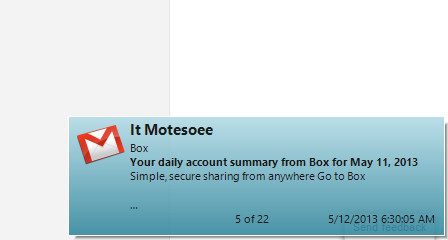
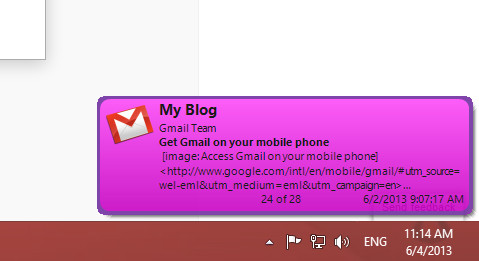
သူငယ္ခ်င္းတို႔ရဲ႕ gmail ေတြ Facebook mail ေတြ Twitter mail ေတြ .. ေအာ္ . mail အားလံုးနီးပါးထဲကို ၀င္လာတဲ့ mail အသစ္ေတြကို ကြန္ပ်ဴတာရဲ႕ ညာဖက္ေအာက္ေဒါင့္ေလးကေန Noti ျပေပးမွာျဖစ္ပါတယ္
ေအာက္ကပံုမ်ိဳးေပါ့


အဲဒီလို ကိုယ့္မွာရွိသမွ်အေကာင့္ေတြရဲ႕ ၀င္လာသမွ် ေမးေတြကို အခ်ိန္နဲ႔တစ္ေျပးညီ
သိရွိႏိုင္မယ္ ..
အလြယ္တကူ နဲ႔ Reply ျပန္ႏိုင္မယ္ ...
ေနာက္ၿပီးတျခား လန္းတဲ့အခ်က္ေတြ အမ်ားႀကီးပဲဗ် ... သံုးၾကည့္မွ ကၽြန္ေတာ္ေျပာတာထက္
ပိုၿပီးမ်ားတဲ့ ေကာင္းကြက္ေတြ ရွိေနပါေသးလားလို႔ လက္ခံလာပါလိမ့္မယ္

ကဲ . .စိတ္၀င္စားရင္ အရင္ဆံုး .. ေအာက္မွာ ေဒါင္းယူလိုက္ပါ


         Download>>>solidfiles (or) dropbox (or) zippyshare (or) uppit


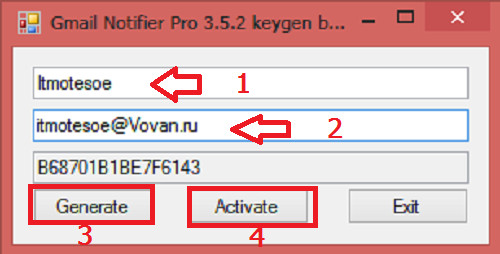
ေဒါင္းလို႔ၿပီးသြားရင္ Full Version ျဖစ္ေအာင္ Crack ပံုကို ေသခ်ာဖတ္ပါဦး

အရင္ဆံုး ေဒါင္းလို႔ရလာတဲ့ထဲက GmailNotifierPro ဆိုတဲ့ exe ဖိုင္ကို Run ၿပီး Install လုပ္လိုက္ပါ

Install လုပ္လို႔ၿပီးတဲ့ ေနာက္ဆံုးအဆင့္မွာ ပ႐ိုဂရမ္ Lunch မလုပ္ေစပဲ ( မ Run ေစပဲ ) ပိတ္ပစ္လိုက္ပါ
တစ္ကယ္လို႔ ဒီအဆင့္မွာေမ့သြားလို႔ Run သြားရင္လည္း ပ႐ိုဂရမ္ကို ပိတ္လိုက္ပါ ၿပီးရင္ ေအာက္က ဘားတန္းထဲမွာ Gmail Notifier ရဲ႕ အိုင္ကြန္ေလး run ေနတာကိုရွာၿပီး Right Click >> Exit လုပ္ေပးပါ
( အဲဒီအိုင္ကြန္ေလးက မ်ားေသာအားျဖင့္ အလံပံုေလးရဲ႕ဘယ္ဖက္က အေပၚျမွားျဖဴျဖဴေလးထဲမွာ ရွိပါတယ္)

ၿပီးရင္ .. ( ေသေသခ်ာခ်ာဖတ္ပါေနာ္ )

၁ .. gmail_not.keygen ဆိုတဲ့ဖိုင္ကို Run လိုက္ပါ ေအာက္ကပံုအတိုင္း ပြင့္လာပါမယ္


ပြင့္လာတဲ့ထဲက Name မွာ ကိုယ္ႀကိဳက္တဲ့နံမည္ထည့္ပါ
email မွာ အဲဒီထည့္ထားတဲ့နံမည္ကို စာလံုးအေသးနဲ႔ @ ရဲ႕ေရွ႕မွထည့္ေပးပါ
ၿပီးရင္ Generate ကိုႏွိပ္ပါ
ၿပီးရင္ Activate ကိုႏွိပ္ပါ
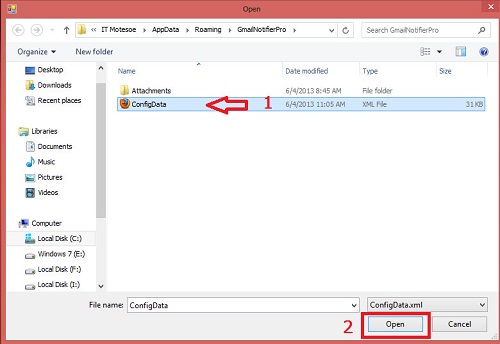
ပြင့္လာတဲ့ထဲကေန

Windows 8 မွာဆိုရင္ partition C ကိုဖြင့္ပါ
Users ဆိုတဲ့ဖိုဒါကိုဖြင့္ပါ
AppData ဆိုတဲ့ဖိုဒါကိုဖြင့္ပါ
Roaming ဆိုတဲ့ဖိုဒါကိုဖြင့္ပါ
GmailNotifierPro ဆိုတဲ့ဖိုဒါကိုဖြင့္ပါ
ConfigData.xml ဆိုတဲ့ဖိုင္ကို ကလစ္ႏွိပ္ၿပီး ေအာက္နားက Open ကိုႏွိပ္ေပးလိုက္ပါ ( ၀င္းဒိုးမွာ Default အျဖစ္ထားတဲ့ Browser ရဲ႕ အိုင္ကြန္ပံုေလးအျဖစ္ ေတြ႕ရမွာပါ

တျခား၀င္းဒိုးေတြဆိုရင္ေတာ့
Partition C
users
%userprofiles%  (ဒါကိုေတာ့ ေတြခ်င္မွေတြ႕မယ္)
Local Settings
Application Data
GmailNotifierPro အဲဒီလို ဖိုဒါေတြကို အဆင့္ဆင့္ဖြင့္၀င္သြားၿပီး
ConfigData.xml  ဆိုတဲ့ ဖိုင္ေလးကို ကလစ္ေပးၿပီး ေအာက္နားက Open ကိုႏွိပ္ေပးလိုက္ပါ


ၿပီးရင္ Gmail Notifier ပ႐ိုဂရမ္ကို ဖြင့္ၾကည့္လိုက္ပါ
ပြင့္လာတဲ့ Box ထဲက ဘယ္ဖက္ေအာက္ဆံုးေဒါင့္နားမွာ Registered ဆိုတဲ့စာလံုးကိုေတြ႕ရင္ Full Version ျဖစ္သြားပါၿပီ

အဲဒီလိုမဟုတ္ခဲ့ရင္လည္း စိတ္မညစ္ပါနဲ႔ အဲဒီေဆာ့၀ဲကို Uninstall လုပ္ၿပီး C ထဲမွာရွိေနသမွ် Gmail Notifier နဲ႔ဆိုင္တဲ့ ဖုိဒါေတြ ဖိုင္ေတြ အားလံုးကို ဖ်က္ပစ္လိုက္ပါ
ၿပီးရင္ Install ျပန္လုပ္ပါ ..
ျပန္ၿပီး Crack ပါ ..
ေသခ်ာေပါက္ Full Version ျဖစ္ေအာင္လုပ္လို႔ရပါတယ္

ကဲ .. Full Version ျဖစ္သြားၿပီေပါ့ ..
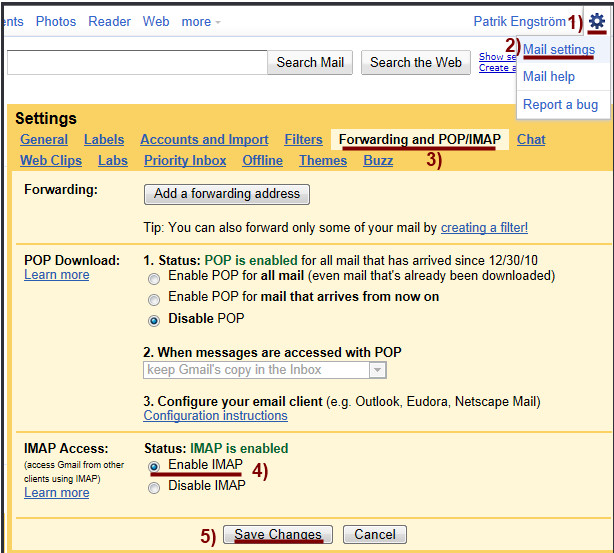
ဒီေဆာ့၀ဲကို မသံုးခင္ အရင္ဆံုး ဒီေဆာ့၀ဲနဲ႔ ခ်ိတ္ဆက္မယ့္ gmail ေတြကို လိုက္ျပင္ရေအာင္
ကိုယ္ခ်ိတ္ဆက္မယ့္ gmail အေကာင့္ကို Sing in ၀င္ပါ
ၿပီးရင္ Settings ကိုႏွိပ္ပါ
ပြင့္လာတဲ့ထဲကေန Mail Settings ကိုႏွိပ္ပါ
ပြင့္လာတဲ့ထဲက Forwarding and POP/IMAP
ပြင့္လာတဲ့ထဲက Enable IMAP ရဲ႕ေရွ႕မွာ အမွတ္တပ္ေပးၿပီး ေအာက္ဆံုးက Save Changes ကိုႏွိပ္လိုက္ပါ
ၿပီးရင္ အဲဒီအေကာင့္ကို Sign Out ျပန္ထြက္ပါ


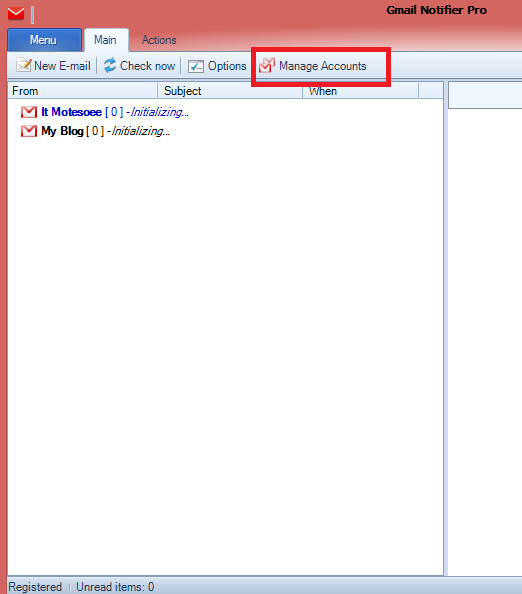
ၿပီးရင္ Gmail Notifier ေဆာ့၀ဲကို Run ပါ
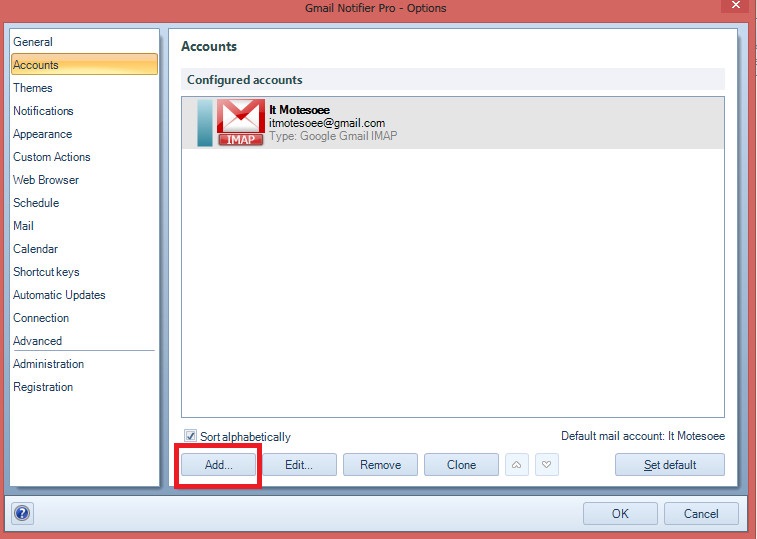
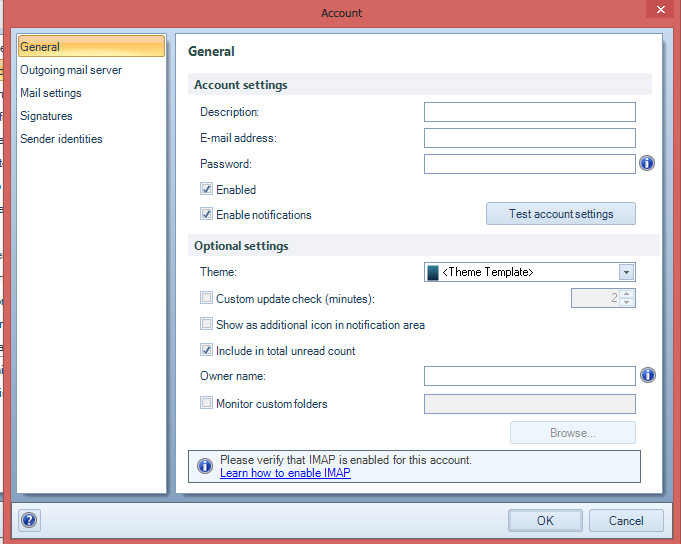
ပြင့္လာတဲ့ Box ထဲက Manage accounts ကိုႏွိပ္ပါ


ပြင့္လာတဲ့ထဲက Add ကိုႏွိပ္ပါ


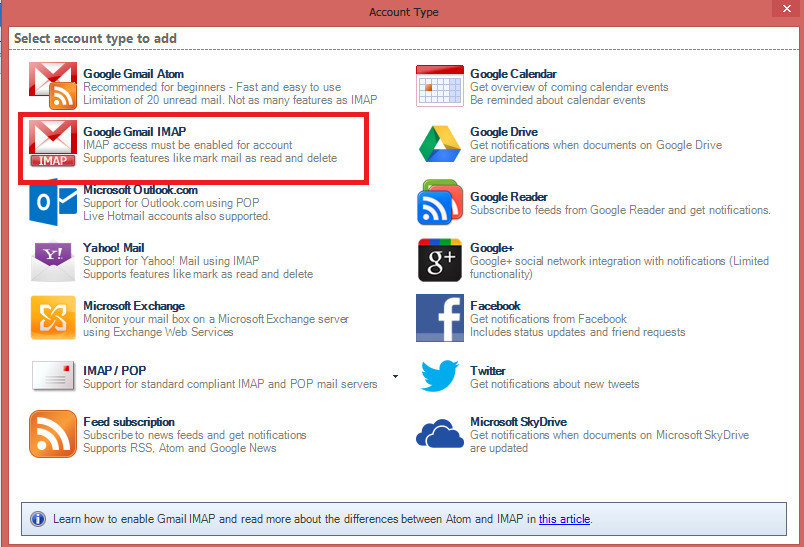
ပြင့္လာတဲ့ထဲက Google Gmail IMAP ကိုႏွိပ္ပါ


ပြင့္လာတဲ့ထဲက Description အကြက္မွာ ကိုယ္သတ္မွတ္ခ်င္တဲ့နံမည္ကို ထည့္ပါ
Email Address အကြက္မွာ ကိုယ့္ခ်ိတ္ဆက္မယ့္ အေကာင့္ရဲက email ကိုထည့္ပါ
password အကြက္မွာ အဲဒီအေကာင့္ရဲ႕ password ကိုထည့္ပါ
ၿပီးရင္ Ok ကိုႏွိပ္ေပးလိုက္ပါ


ဒါဆိုရင္ အေကာင့္တစ္ခု ခ်ိတ္ဆက္ျခင္း ၿပီးသြားပါၿပီ ..
တျခားေနာက္ထပ္ အေကာင့္ေတြကိုလည္း ဒီလိုပဲ အဆင့္ဆင့္ ခ်ိတ္ဆက္ေပးလိုက္ပါ

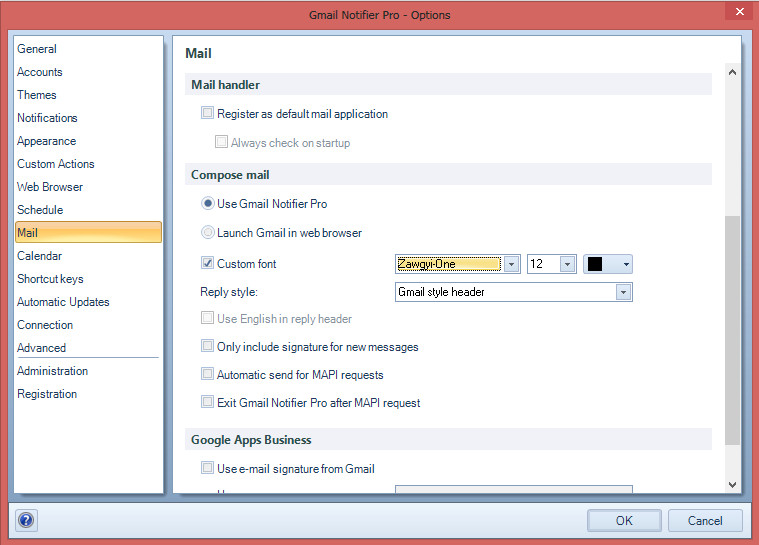
ကဲ .. ၿပီးရင္ gmail notifier မွာ ေဇာ္ဂ်ီေဖာင့္ ျမင္ရေအာင္
Mail ကိုႏွိပ္ၿပီး ပြင့္လာတဲ့ ဘယ္ဖက္အျခမ္းထဲက Custom font ေရွ႕မွာအမွတ္တပ္
ၿပီးရင္ Zawgyi One ကိုေရြး
ေအာက္ဆံုးက Ok ကိုႏွိပ္ ...


ဒါဆိုရင္ .. အဆင္ေျပသြားၿပီ 

Gmail Notifier Pro 5.0.1 Full Version


Gmail Notifier Pro is a Windows application capable of checking multiple Gmail accounts for new mail and display notifications.

Feature highlights
- Check multiple Gmail accounts, including Google Apps, for new mail.
- Supports both Atom and IMAP protocols for mail.
- Supports customizable themes and individual account settings, making Gmail Notifier Pro the best looking Gmail notifier on the web!
- Read, write, reply, preview and save attachments, mark as read and delete mail without the web browser. Supports Google Contacts.
- Integration with Google Calendar accounts gives reminders for calendar events.
- Get news notifications from Google News & Google Reader.
- Supports RSS/Atom feeds to get notifications from any news source.
- Gmail Notifier Pro provides many easy-to-use features and settings.
- Define schedules when to check for mail and display notifications.
- In addition to the installation package, Gmail Notifier Pro can also run from a USB-stick without any installation.
- Gmail Notifier Pro supports automatic updates. A new version can be downloaded and installed with a single click.
- Secure account management and encrypted connections (HTTPS / SSL) are used. 100% FREE from virus, spyware and adware.
- Gmail Notifier Pro is simply the best Gmail notifier for Windows.
- Supports 32-bit & 64-bit Windows XP, Windows Vista & Windows 7.
But, it is Ok in Windows 8 ( tested by me).
You can download the program included keygen below link.
Be Enjoy! :)  

                                                    Credit=>အိုင္တီမုဆိုး


Sunday, May 26, 2013

Yamicsoft Windows 8 Manager 1.1.1 Full Keygen


ဒါေလးက Windows 8 ကို Clean, Optimize, Customize, Security စတာေတြအတြက္အေကာင္းဆံုး
ကူညီေပးမယ့္ Software ေလးလည္းျဖစ္ပါတယ္။ အေရွ႔မွာလည္းတင္ေပးခဲ့ဘူးပါတယ္။ အခု Update
Version ေလးရလာလို႔တင္ေပးလိုက္တာပါ။ အခု ဒီ Version မွာ windows store uninstaller & update,
Context Menu Manager နဲ႔ အျခား Tools အခ်ိဳ႕ပါဝင္လာတာေတြ႔ရမွာျဖစ္ပါတယ္။


Download>>>zippyshare (or) solidfiles (or) dropbox (or) uppit


Windows 8 Manager is a system utility that helps you optimize, tweak, repair and clean up Windows 8. It will increase your system speed, eliminate system fault, improve system security, and meet all of your expectations.Windows 8 Manager is a system utility that helps you optimize, tweak, repair and clean up Windows 8. It will increase your system speed, eliminate system fault, improve system security, and meet all of your expectations.

Features and Benefits of Windows 8 Manager

Information:
Get detailed system and all hardware information on your system; help you find out the installation key of Windows, Office products; show all detailed information of running processes and threads on your machine; Windows 8 Manager offers 1-clicking Cleaner cleans your system automatically; Repair Center helps you to fix various system problems.

Optimizer:
Tweak your system to improve windows startup and shutdown speed, tweak your hardware to increase system speed and performance; Control what is started on Windows startup, check and repair the advanced starup items to restore the malicious change by viruses; Tune up and optimize system services and Task Schedule, turn off smartly some unnecessary system services and tasks to improve system performance.

Cleaner:
Find out which files or folders engross your disk space and shown with chart; Smart Uninstaller can fully delete programs from your system without residual files and Registry entries; Find and clean junk files to increase Hard Disk space; Duplicate Files Finder can scan your computer for files with the same size, name and modification time; Registry Cleaner checks and repair incorrectly linked Registry entries; Registry Defrag rebuilds and re-indexes your Registry to reduce registry access time and therefore improve application responsiveness; Desktop Cleaner can clean useless icons and files on Desktop easily.

Customization:
Customize the look of your system by tweaking system Explorer, Desktop, Start Menu, Taskbar and notification area; Create the quick startup items on Taskbar with the Jump List launcher; Tune up Windows 7 boot menu; Edit context menus of mouse Right-Clicking; Edit easily the Win + X menu that shown when right-click on Desktop bottom-left corner or Win + X keyboard shortcut ; Create the shortcut that executed quick on run dialog box. Visual Customizer can change system and file type icons, custom the logon background.

Security:
Improve system security by tweaking system components, UAC and login settings; Tune up System Restore options; Hide and restrict to access drives and programs; Encrypt/decrypt files, move system folders to safe locations; Undelete the files that accidentally deleted or formatted on disk; Privacy Protector can maintain your personal privacy by eliminating the tracks that you leave behind; Hide, add or delete the Control Panel entries.

Network:
Optimize your Internet connection speed, manage all shares items; Tweak your Internet Explorer easily; IP Switcher can switch your IP address easily on different networks; Edits the Hosts file to speed up surfing internet and permit only to access the specified Hosts.

Misc. Utilities:
Show the collection of Windows utilities; split and merge any files; Automatically back up files regularly using Super Copy. Registry Tools help you to operate Registry easily.


  • Changes in 1.1.1:
  • Add Windows Store App Uninstaller
  • Context Menu Manager updated to v1.5
  • Windows Store App Settings updated to v1.5
  • Add some tweaks


Thursday, May 16, 2013

Genuine Registry Doctor 2.6.2.6 Full Version

၀င္းဒိုးစနစ္ထဲမွာသိပ္ကို အေရးပါတဲ့ Registry ပိုင္းကိုerror ေတြ စစ္ေဆးေပးတာ Fix ျပန္လုပ္ေပးတာေတြကိုထိထိေရာက္ေရာက္ ေဆာင္ရြက္ေပးမယ့္ ေဆာ့၀ဲေလးပါ၀င္းဒိုးစနစ္ႀကီးရဲ႕
 Registry ပိုင္းမွာ Error ေတြ မ်ားလာမယ္ဆိုရင္ကြန္ပ်ဴတာဟာလည္း တစ္ေန႔တစ္ျခား အသံုးျပဳရတာေႏွးေကြးေလးလံလာမွာ ျဖစ္ပါတယ္ ဒါေၾကာင့္ ကိုယ့္ကြန္ပ်ဴတာထဲမွာ ရွိ
တဲ့ Registry ပိုင္းကို ပံုမွန္စစ္ေဆးျပဳျပင္ေပးမယ့္ ေဆာ့၀ဲတစ္မ်ိဳးေလာက္ေတာ့ Install လုပ္ထားသင့္ပါတယ္ကဲ .. လိုခ်င္တဲ့ သူငယ္ခ်င္းမ်ားေအာက္မွာ ေဒါင္းယူလိုက္ပါခင္ဗ်ာ...


 Download>>>zippyshare (or) solidfiles (or) sharebeast


ေဒါင္းလို႔ၿပီးရင္ Setup ဖိုင္ကို Install လုပ္လိုက္ပါ
ၿပီးရင္ Patch ဆိုတဲ့ ဖိုဒါထဲကဖိုင္ကို C >> Program files >> GenuineRegistrydoctor ဆိုတဲ့
ဖိုဒါထဲကို ကူးထည့္လိုက္ပါတက္လာတဲ့ Box ကို Replace ပါတာေရြးေပးလိုက္ပါဒါဆိုရင္ Full Version
 အျဖစ္ အသံုးျပဳလို႔ ရသြားပါၿပီကဲ .. အဆင္ေျပၾကပါေစဗ်ာ


Genuine Registry Doctor 2.6.2.6 With Crack


Genuine Registry Doctor - multifunction program to clean, optimize and fix the registry errors of the operating system Windows.
The program allows you to remove obsolete entries from the registry and temporary files, Windows, clear the history of the web browser (for Internet Explorer), you can search for duplicate files and function of scanning the hard drive for errors.
Always troubled by the slow speeds, sudden crashes and a bunch of errors? Why not fix all the system errors and explore the vast potential of your PC and enjoy a more secure network environment? With Genuine Registry Doctor, you just need a couple of clicks to accomplish that! It diagnoses all your system's errors and gives you the most professional treatment.
Thus you need not to take the pain to spend a large amount of money on fixing or reinstall Windows.

Program Features:

Solid scan and fix

Completely scan the entire system and diagnose problems of registry, privacy, junk files and system. Genuine Registry Doctor offers you a way to fix all the errors and optimize PC system.

Multi-functional

A number of built-in utilities, such as Startup Manager, Disk Cleaner, File Pulverizer, etc., Strongly enhance the performance of Genuine Registry Doctor.
You just need one small free app to own all the useful functions.

User-friendly

The very smooth download and installation, the clean and well-organized interface, the easy-to-understand navigation make Genuine Registry Doctor
extremely easy to handle even for the novices.

100% free and safe

Genuine Registry Doctor would like to allow users to enjoy the free software, clean and safe PC environment. There is no adware, no spyware,
 no viruses in it, and it will never let you down.

Automatic protection

Genuine Registry Doctor makes all its efforts to protect your PC and your privacy under real-time protection by its smart automatic scan and sweep function.

Click HERE to download the program for free.

နည္းပညာလမ္းေၾကာင္းေပၚကသူငယ္ခ်င္းအားလံုးကို ေလးစားခင္မင္လွ်က္အိုင္တီမုဆိုးထံမွၿပန္လည္
မ်ွေ၀လိုက္ပါသည္............